Pages

Showing posts with label Models. Show all posts

Sunday, April 7, 2013

3D Boat Design Software

3d boat design software
I recently found a nice 3D boat design software to help you design anything that floats. If you have ever wanted to design a boat yourself then this is the program for you. 3DBoatDesign is a versatile CAD software package that is easy to use yet also powerful at the same time. Some feature of 3DBoatDesign include enhanced hydrostatic calculations, easy 3d scaling, rotating, and moving, hull sculptor, resistance calculations and more!

3DBoatDesign is to boats as NoLimits Simulator is to roller coasters - simply the best available software to everyday consumers and affordable too!
cad boat design

Download 3D Boat Design today and starting designing the watercraft of your dreams!

Wednesday, January 9, 2013

CATIA Lego Training Download

lego_cad_software
I’ve long looked for a good LEGO CAD program and today I’ve finally found one. John B Cearns, founder and
owner of Solid Engineering Solutions, has created an outstanding exercise to help students learn how to use CATIA’s Assembly Design workbench while being super fun at the same time.


While building the Lego model you’ll learn how to use catalogs in CATIA to create different Lego blocks in 3D. Not all the parts required to make the Four Wheeler and Rebel Wrecker are present in the CATParts folder. There are 72 parts missing from this folder but they have provided 12 tabulated parts for you to use to easily create the missing 72 parts. Step by step instructions are provided in the documentation for both sets.  The Four Wheeler contains 102 different parts and the total parts are 338. The Rebel Wrecker contains 123 different parts and the total parts are 468.

catia lego model

The free download contains all instructions necessary to assemble the Four Wheel and Rebel Wrecker. Or, if you just want to build the physical Lego sets you could just do that as well using these instructions. Get them here:

After you have created these two CATProduct models, there is a wealth of Kinematics joints you can perform on them: Revolute Joint, Cylindrical Joint, Spherical Joint, Rigid Joint, Universal Joint, Gear Joint, Cable Joint, and Rack Joint. The Lego parts also use a relation law created by a Multiple Value User Parameter to define the color: PartBody.Color = PartBodyColor.

This exercise is a great example if you want to use CATIA or other CAD software as a Lego design software. Many different bricks can be created from the template of a few using catalogs. All around, I highly recommend checking out this tutorial because, as I said, it is a lot of fun and very educational too (and it's free)!

Download the Lego CAD files and instructions here:http://www.solengsol.com/solid_engineering_downloads.htm
Please note: CATIA V5 R19 is required.

Monday, June 11, 2012

Kinect Hack Video: CATIA V5 Manipulation


KinectCAD for CATIA V5

I recently stumbled upon one of the coolest Kinect applications I’ve ever seen. The Kinect is Microsoft’s Xbox 360’s latest webcam style peripheral. This new high tech toy permits users to “be the controller” through natural user interface (NUI) by controlling the game with their voice and body movements. Microsoft took it a step further and released the Kinect software development kit (SDK) for Windows 7 allowing developers to write Kinect applications in C++, C#, or Visual Basic .NET. There are numerous “Kinect hacking” videos on YouTube. One such user has now manipulated the Kinect to provide a gesture based movement of CATIA part objects.


How to use Kinect with CATIA V5? Using this new application in development it is now possible to rotate and zoom in or out of your new Kinect 3D CAD model while standing in front of your monitor and using your arms. It gets even better: utilizing Kinect’s built in microphone there is a rudimentary speech recognition function you can use to change the rotation axes. Can you imagine creating every part in CATIA this way (or any other CAD system for that matter)?

Using the SDK V1 software for Kinect, KinectCAD has been created in Visual C# 2010. It may be a slow way to work (at first) but is a brilliant concept nonetheless. Pretty soon we’ll be seeing 3d Kinect models of all our CAD parts. It would be a great way for automakers to perform layout check in conference rooms (and funny to watch  too). Hats off to the creators and I can’t wait to see more. Checkout the Kinect video recording below:


Please note: this program is still in development.  To learn more please visit this site. So, what do you think of KinectCAD? What other applications could you see between Xbox Kinect and CATIA V5? Please leave a comment below!

Tuesday, February 21, 2012

Solid Edge Synchronous and Ordered Modeling Video Tutorial

Ally PLM released their latest Lunch Byte video tutorial, this time covering the topics of synchronous and ordered modeling. These videos are meant to showcase some of the feature of Solid Edge that you may not be aware of. Watch the embedded tutorial below to learn about how synchronous modeling accelerates the design process allowing for fast and flexible edits.

Saturday, January 28, 2012

Solid Edge simulation express video

Ally PLM returns with another video edition of Lunch Bytes, this time talking about Solid Edge simulation express. Watch the Solid Edge video tutorial below.
 

Saturday, December 3, 2011

Gift Ideas for CAD and 3D Modelers

Are you shopping for a CAD user, 3D modeler, or an engineer? Well, I have a couple of holiday gift suggestions for you.

A full-color guide to the #1 architectural drafting program—AutoCAD 2012 for Dummies. AutoCAD is the leading software used to create 2D and 3D technical drawings. Used by engineers, architects, and drafting professionals, it can be complex and is a perfect subject for the tried-and-true For Dummies format. Full-color illustrations make the instructions even easier to follow, because examples in the book appear exactly as they will on the screen.


Fully updated for the latest version of software, Kelley’s Pro/ENGINEER Wildfire 5.0 Instructor remains organized around step-by-step tutorials — the most effective way to teach and learn this procedure-intensive CAD application. Pro/ENGINEER Wildfire 5.0 Instructor provides a solid background in parametric design and constraint-based modeling. In addition, the comprehensive references make this text an all-in-one tutorial, reference, and lecture guide for students of Pro/ENGINEER.


CATIA V6 (Computer-Aided Three Dimensional Interactive Application) is the world's leading multi-platform CAD/CAM/CAE software suite marketed worldwide by IBM. It allows the user to apply its capabilities to a variety of industries such as automotive, industrial robots, electronics, manufacturing design, aerospace, and consumer goods. CATIA V6 Essentials includes all the major concepts related to the latest version of CATIA, such as installation, modes, and modeling in an easy-to-understand, step-by-step format. It also covers all the major commands and techniques and provides the reader with all of the details to learn the basics with a clear method of instruction. This comprehensive reference will help you navigate this multifaceted software with ease.


Solid Edge ST3 for Designers is a comprehensive textbook that introduces the users to direct modeling with precise control of dimension-driven design through precision sketching and selection handles using the Solid Edge ST3 software. The textbook covers all major environments of Solid Edge ST3 in both the Synchronous and Ordered modeling with a thorough explanation of all tools, options, and their applications to create real-world products.

And some shameless self-promotion. Have you ever wondered what it takes to design and build a roller coaster? At last, there’s a book that shows you. A mix of engineering and art, roller coasters are complex three-dimensional puzzles consisting of thousands of individual parts. Designers spend countless hours creating and tweaking ride paths to push the envelope of exhilaration, all while maintaining the highest safety standards. Coasters 101: An Engineering Guide to Roller Coaster Design examines the numerous diverse aspects of roller coaster engineering, including some of the mathematical formulas and engineering concepts used.

Monday, August 8, 2011

CATIA 2011 Visualation Contest

This year's CATIA visualization contest has finally gone live. If you are passionate about 3D creations and your imagination knows no bounds, whether you are an amateur or professional designer, Dassault Systems want to reveal your talent. Enter the contest to exhibit your best realistic rendering image based on your favorite 3D creation. The Contest will evaluate realistic rendering images that use CATIA functionalities. Whether a real-time screen-shot or a calculated rendering, the designer's image will be submitted to a panel of CATIA experts and fans will be able to vote for it via the application. The contest runs from July 21 to September 9, 2011. The two best competitors, selected by the fans and by the CATIA experts, will win an Apple iPad2.

I have entered my cantilevered coaster design. I would really appreciate it if you would consider voting for me here.


http://apps.facebook.com/dassault-catia/profile/150.html

Monday, August 1, 2011

Quick Tips: How do you reset the compass to the default position?

If you're using CATIA V5 and you notice your position compass in the upper right hand corner may sometimes display a weird or unique angle. How do you reset the compass to the default position?


Try any of these methods:

1) Select the View Pulldown then select Reset Compass

OR
1) Place your cursor over the red dot on the compass, the cursor graphic will change to arrows for up & down, left & right

2) Press & hold the select button then drag & drop the compass with the cursor to the global axis displayed in the lower right corner of the screen

OR
1) In the power input area (lower right corner of the screen) enter c:reset compass

Copy next rows in a CATScript file and run the CATScript

Sub catmain()

CATIA.StartCommand "Reset Compass"

End Sub

And yet another method I accidentally found to work is:
1.) right click on an axis system and select 'set as current'  
2.) right click on same axis system and select 'set as NOT current'

Read more CATIA and CAD tips here. 

Monday, July 25, 2011

Theo Jansen Machanism Matlab Code Download Updated

The matlab code for the Theo Jansen mechanism has been updated and is now available for download. Also, in exchange for using my code I would appreciate your help by subscribing to and promoting the site and sharing it with your family, friends and coworkers. Please subscribe to my YouTube page and consider following me on Twitter. Thanks!


Theo Jansen matlab code file download

Wednesday, January 12, 2011

How do you create a composite part in CATIA Composites Design workbench?

First of all, before we begin getting into creating parts I want to review some information and notes about composites.

What is a composite? Composites = Matrix (resin) + Reinforcing Material (Fiber)

Types of resin include: Polyester, Vinylester, and Epoxy.

Type of fibers include glass, carbon, Kevlar, and aluminum.

Why use composites? Benefits include: reduced weight, high strength and stiffness properties, high thermal and corrosion resistance, and a good fatigue life. What are the manufacturing technology benefits from using composites? Tailor ability, flexibility, and part number reduction.

How are composites manufactured? There are several different methods:

  • Fabric Hands Lay-up – monolithic type or sandwich structures
  • Tape Laying – large composite structures
  • RTM – complex shapes
  • Fiber Placement – large composite structures
  • Filament winding – mandrel shapes
What are some of the cons and challenges of using composites? Number one factor is cost; the raw material can be expensive. There's also a large upfront investment required for manufacturing facilities and equipment. Composites are hard to model due to their unpredictable behavior. Manufacturing cycle time can be longer than machined or sheet metal parts. There are also health hazards and reusability issues.

Composite Terminology

  • IML=inner mold line. Corresponds to top surface of a composites part
  • NCF=non crimp fabrics
  • ETBS=Edges to be Staggered
  • EOP=Edge of Part
  • MEOP=Manufacturing Edge of Part
  • EEOP=Engineering Edge of Part
  • Rosette=axis system
  • TL=thickness law
  • SS=Stacking Sequences
There are two primary methods of creating a composite part in CATIA Composites Design workbench: grid and zone

For the grid method the part is divided up into a grid. Each section of the grid has a name (C1, C2, etc.). Each section of the grid is then given a defined thickness law. The thickness law says how thick the material will be in that zone. This is done by indicating the number of plies in each direction. Example:

Thickness Law 1's material will be Carbon 0.4. # plies in the zero degree direction = 8, number of plies rotated 45 degree = 8, number of plies rotated -45 degree=8, number of plies rotated 90 degrees=9.

Looks like this in Excel which is then imported into CATIA.

#          
TL1
0
45
-45
90
default
Carbon 0.4
8
8
8
8
0


Thickness laws can be applied manually or imported through an Excel table.

Be sure to become a follow of this blog and stay tuned for more about composites!

Saturday, December 11, 2010

Coaster Model Update

Quick update on the cantilevered roller coaster model. I used my VB catscript to quickly and easily create the cross-ties for the upper and lower rails. I also modeled all of the supports and cement footers. Pictured is one of the "side/head knocker" effects where it looks like you are about to run into a post before the cantilevered car serves out of the way in the nick of time. There is also an overview of the layout. Video coming soon!


Thursday, August 19, 2010

Steel Roller Coaster Modeled in CATIA V5

As you can see from many of my previous posts, I spend quite a bit of time modeling roller coasters in CATIA. Well, it looks like I'm not the only one. Yunus Alapan, a student at Yildiz Technical University in Istanbul, Turkey, recently submitted a few pictures of a roller coaster he created with CATIA V5. I know from experience how hard and time consuming  it is to model a complete roller coaster by yourself, piece by piece. Hopefully, one day we will see some cars running around the track. Good job Yunus!


And since we are on the topic of CAD coasters, check out my latest simulation of the Cantilevered Roller Coaster. This time I show case the “side knocker” effect! More kinematics experimentation on the CRC model with a mismatch of new and old parts.

Monday, March 8, 2010

Update on CATIA Train Model

I promise to do a complete "How to" later on, seeing as how this is the CAD Systems Help blog and I don't think I've done much to help other than show off my own work. Here is my progress after about 8 hours of work on the Locomotive 020T Decauville CATIA model, which I uploaded to my 3D Via page. What do you think?

Wednesday, March 3, 2010

AutoCAD to CATIA: Train CAD Model

I'm working on a new project where I am taking AutoCAD drawings of a steam locomotive and recreating it in 3D with CATIA. After about 4 hours of work here is the result (from 3D Via):


I will be writing a full how-to on this later so stay tuned!

Sunday, February 28, 2010

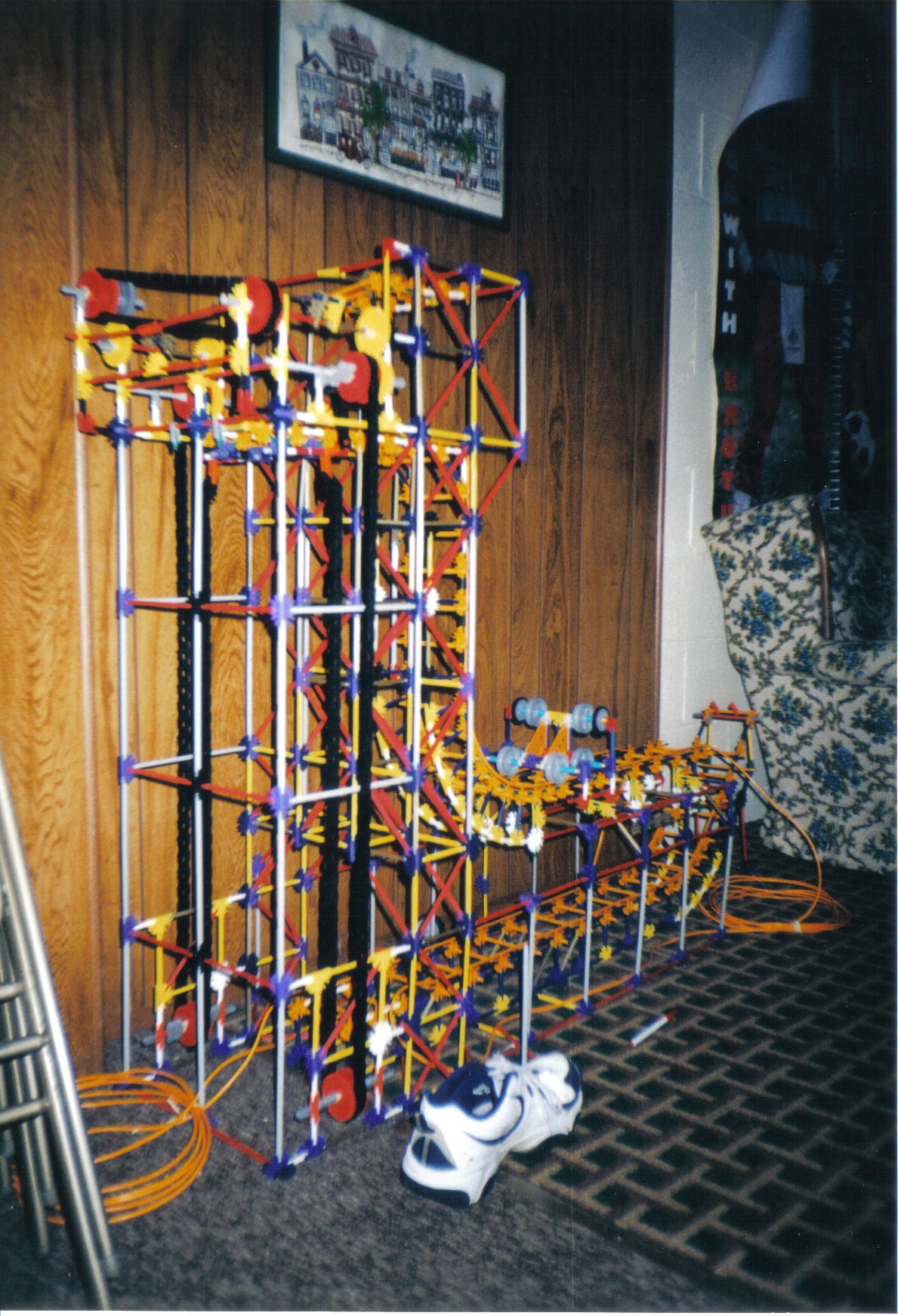
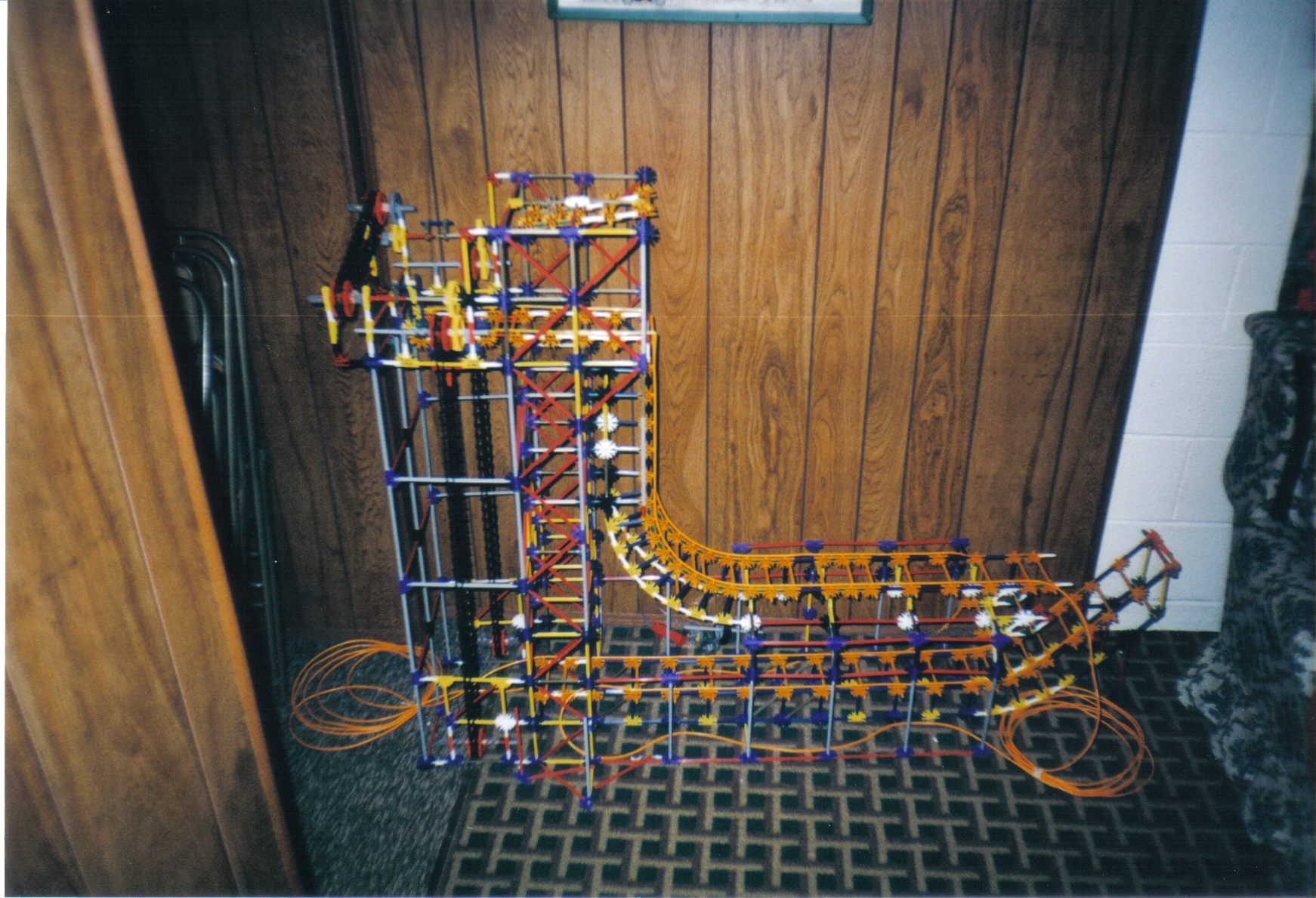
My K'nex Coaster Models

As a mechanical engineer and a roller coaster enthusiast, I have always wanted to design or build roller coasters. While I may never get the chance to work on a real one, I have built several coasters out of K’nex back in the day. You remember K’nex right? The plastic rods and connectors which you connect together to form all kinds of contraptions. I recently found some pictures I took of my creations and would like to share them with you today.

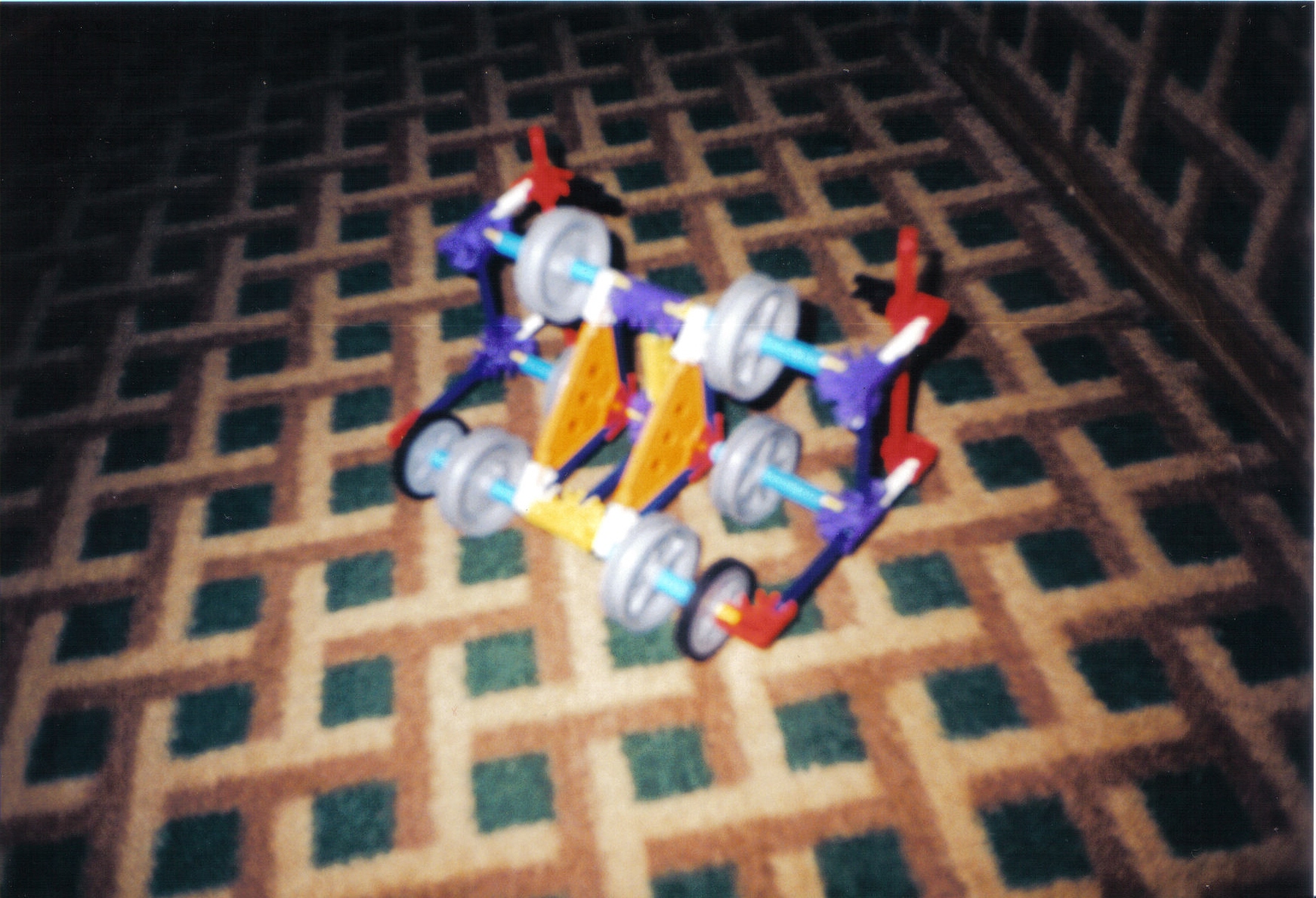
Intamin Free Fall: Inspired by the former Demon Drop at Cedar Point, this is a fully functional Intamin Free Fall ride. The car has 6 wheels in a triangular configuration. Wind the crank and the elevator hoists the car to the top with chains. The car moves forward on its own but you have to manually disengage the mechanism that lets the car drop down the track and into the brake run.


For more head over to Coaster101!

Tuesday, February 9, 2010

What are the advantages of using rendering in CATIA?

Designer and engineers today need to constantly visualize, present and communicate their ideas and design. This can be very hard to do without the right tools. Visualization is an important component of the design process to, from marketing material to the design review, it is essential to have a natural support to easily communicate your concept and product. This is where rendering in CATIA steps in.


CATIA Rendering delivers all the appropriate tools for real-time visualization and photo-realistic rendering. You can create and manipulate your materials, lights and environments producing realistic and believable computed images. Rendering in CATIA replaces the need of a physical prototype, allowing for faster decision making and cost reductions!


Here is a quick example of what I mean. Say you are designing a new type of bike for a major manufacturer. Upper management and marketing want to see what the finished product may look like and what sort of uses the bike will have so they can target their market audience and formalize their marketing strategy. The design isn’t very far along yet, below is all that has been done in CATIA assembly design:


Click on the Render icon, it looks like a camera.


The render tool bar pops up. 

You can change the background to an image supplied by Dassault or you can choose one of your own. Adjust the lightning other rending options as needed.


For the best looking image, be sure to orient and light your product in a way that makes sense. Use the lines on the grid to help orient your object. I used the edge of the road as a reference to match against the grid.


Finally, hit the render button and after a few moments the specification tree and toolbars are hidden and you are left with a high quality image that can be sent out. Your design has been conceptualized with new life!


Below are a couple images I took with CATIA models I have built utilizing the CATIA rendering image creator.